Transforming Your Tech: Why Laptop Stickers Are More Than Just Decor
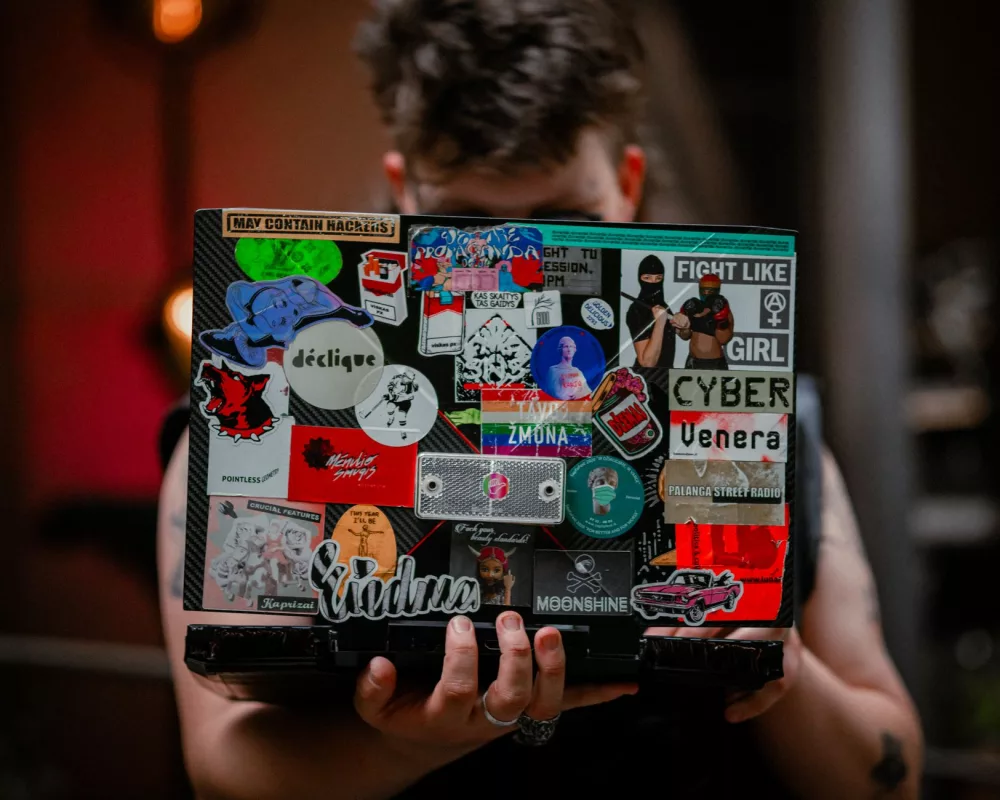
You know, it's pretty wild how much of our lives we spend interacting with our laptops these days. They're not just tools; for many of us, they're central to work, creativity, and connection. So, it's really no surprise that people want to make these essential devices feel a bit more, well, theirs. That's where laptop stickers come in. I often think of them as tiny canvases for personal expression, capable of transforming a generic piece of tech into something truly unique and reflective of who you are. It’s not simply about slapping on a random design; there’s a whole world to explore regarding their purpose, types, and how to best use them.
When I look at my own laptop, for example, it tells a story through the collection of decals I've accumulated over time. There's the logo from that coding conference I attended, a tiny illustration of my favorite animal, and even a sticker from a local coffee shop I adore. Each one holds a little memory or represents a part of my identity. This personal touch is something we all crave, isn't it? Our gadgets don't have to be bland, uniform rectangles. We can infuse them with personality!
Beyond Aesthetics: The Many Roles of Laptop Stickers
While the visual appeal is certainly a huge draw, I've found that laptop stickers actually serve several practical functions too. It’s quite interesting when you stop to think about it.
- Personalization & Self-Expression: This is probably the most obvious one. Stickers let us show off our hobbies, passions, political views, or simply our aesthetic preferences. My friend, for instance, has a bunch of stickers related to her favorite sci-fi series. It’s an instant conversation starter!
- Protection Against Scratches: Believe it or not, a well-placed sticker or skin can offer a thin layer of defense against minor scuffs and scratches. It won't save your laptop from a major drop, but it can definitely keep the surface looking newer for longer. I've had a few instances where a sticker took the brunt of a key scrape instead of my actual laptop casing.
- Branding & Marketing: For businesses or freelancers, branded stickers are an excellent, low-cost marketing tool. Imagine your logo or a catchy slogan subtly displayed wherever you work. It's a fantastic way to increase visibility and keep your brand top-of-mind.
- Quick Identification: In an office or school environment where many identical laptops might be present, stickers make it incredibly easy to spot your device from a distance. No more accidentally grabbing someone else's MacBook!
- Covering Up Imperfections: Let's be honest, accidents happen. A small scratch, a tiny dent, or a faded spot can be cleverly concealed with a strategically chosen sticker. It's like giving your laptop a quick, affordable facelift.
Exploring the World of Sticker Materials and Types
Not all stickers are created equal, and knowing the differences can make a big impact on your satisfaction. When I'm looking for new decals, I always consider the material.
- Vinyl Stickers: These are probably the most common and versatile. They're durable, water-resistant, and come in a vast array of colors and finishes, including matte, glossy, and even holographic. I personally love vinyl because it's usually easy to apply and remove without leaving behind sticky residue, which is a major plus for anyone who likes to change up their laptop's look periodically.
- Die-Cut Stickers: These are vinyl stickers cut precisely to the shape of their design, rather than being a square or circle with a border. They look really clean and professional, giving a very integrated feel to your laptop.
- Decals: Often used interchangeably with stickers, decals typically refer to designs that are meant to be transferred from one surface to another. Think of those intricate designs that come on transfer paper – you press them on, peel off the top layer, and the design remains.
- Reusable & Static Cling Stickers: These are less common for laptops but exist. They don't have traditional adhesive; instead, they cling to smooth surfaces. They're great if you're super indecisive or want to temporarily adorn your laptop for an event without any commitment.
- Custom Stickers: Many services allow you to design your own stickers. This is fantastic if you have a specific image, logo, or message you want to display. I've used custom sticker services for personal projects and they've always turned out great.
- Skins & Wraps: While not individual stickers, these are full-body adhesive covers designed to completely change the look of your laptop. They offer maximum protection and a unified aesthetic, often mimicking materials like wood grain or brushed metal. They are a different beast entirely, but worth mentioning as an alternative to individual stickers.
My Tips for Choosing and Applying Stickers Like a Pro
Getting the perfect look isn't just about picking a design; it's also about a little bit of planning and careful execution. Trust me on this one; I've learned from my own mistakes!
Choosing Your Stickers:
- Consider Laptop Finish: Does your laptop have a matte or glossy finish? Some stickers might look better on one than the other. Also, consider how the sticker material will interact with the laptop's surface texture.
- Durability is Key: Opt for high-quality vinyl. Cheaper stickers might peel quickly, fade, or leave a nasty residue when removed. You don't want that!
- Placement Strategy: Think about the overall layout. Do you want a single, prominent sticker, or a collage? Will it interfere with any vents or ports? My advice: lay out your stickers first before peeling any backing.
- The Message: What message do you want your laptop to convey, especially if it's used in professional settings? Keep it appropriate for your environment.
Applying Them Flawlessly:
- Clean the Surface: This is a non-negotiable first step. Use a microfiber cloth and a mild cleaner (like isopropyl alcohol diluted with water) to remove any dust, oils, or grime from your laptop's surface. A clean surface ensures better adhesion.
- Start with a Dry Surface: Make absolutely sure the laptop is completely dry before you start sticking anything on.
- Position Carefully: Don't just slap it on! Gently place the sticker on the desired spot without pressing it down firmly. This allows you to reposition if needed.
- Smooth it Out: Once you're happy with the placement, start pressing down from the center of the sticker outwards, using a credit card or a squeegee to smooth out any air bubbles. Take your time here; patience is a virtue!
- Peel Slowly (for transfer stickers): If you're using a transfer decal, peel the transfer paper away slowly and at a sharp angle to ensure the design sticks to your laptop and not the paper.
When It’s Time for a Change: Sticker Removal Made Easy
Eventually, you might want to refresh your laptop's look or perhaps remove a sticker that's seen better days. Fear not, it's usually quite simple!
- Gentle Heat: A hair dryer on a low heat setting can work wonders. Warm up the sticker for 10-20 seconds; this softens the adhesive, making it much easier to peel.
- Peel Slowly: Once warmed, start peeling from a corner, pulling slowly and steadily at a shallow angle. If it resists, apply more heat.
- Residue Removal: If some sticky residue remains, a small amount of rubbing alcohol or a specialized adhesive remover like Goo Gone (test in an inconspicuous area first!) on a microfiber cloth can usually clean it right up. Avoid harsh chemicals that could damage your laptop's finish.
A Final Thought on Your Personalized Canvas
Ultimately, laptop stickers are a fantastic way to inject personality and function into an otherwise standard device. They offer a simple, reversible, and relatively inexpensive way to customize something we use constantly. Whether you're looking to protect your laptop, express your individuality, or subtly promote your brand, there's a sticker out there for you. So go ahead, make your laptop truly yours. It's a fun and creative process, and I think you'll really enjoy the transformation.